
Text Capture messaging terms
Text Capture lets you save a memory by texting it to us. This page describes the messages that involves — what we send, how often, and how to stop.
Last updated: 15 September 2026.
The short version
- You opt in inside the Storygarden app, by entering your own number and confirming a code we text you.
- We only ever text a number whose owner has confirmed that code.
- We never send marketing or promotional messages. There is nothing to unsubscribe from except the feature itself.
- Reply STOP to stop, HELP for help.
- Message and data rates may apply.
How you opt in
Text Capture is off until you turn it on. In the app, under Settings → Text Capture, you type your own mobile number and tap Send me a code. We text a six-digit code to that number, and it is not connected to your account until you type that code back into the app.
That two-step confirmation is the whole consent mechanism, and it has a consequence worth stating plainly: nobody can sign your number up but you. We do not buy, rent, import, or upload phone numbers, and there is no way for one person to add another person's number to Storygarden.
The words you agree to, exactly as the app shows them
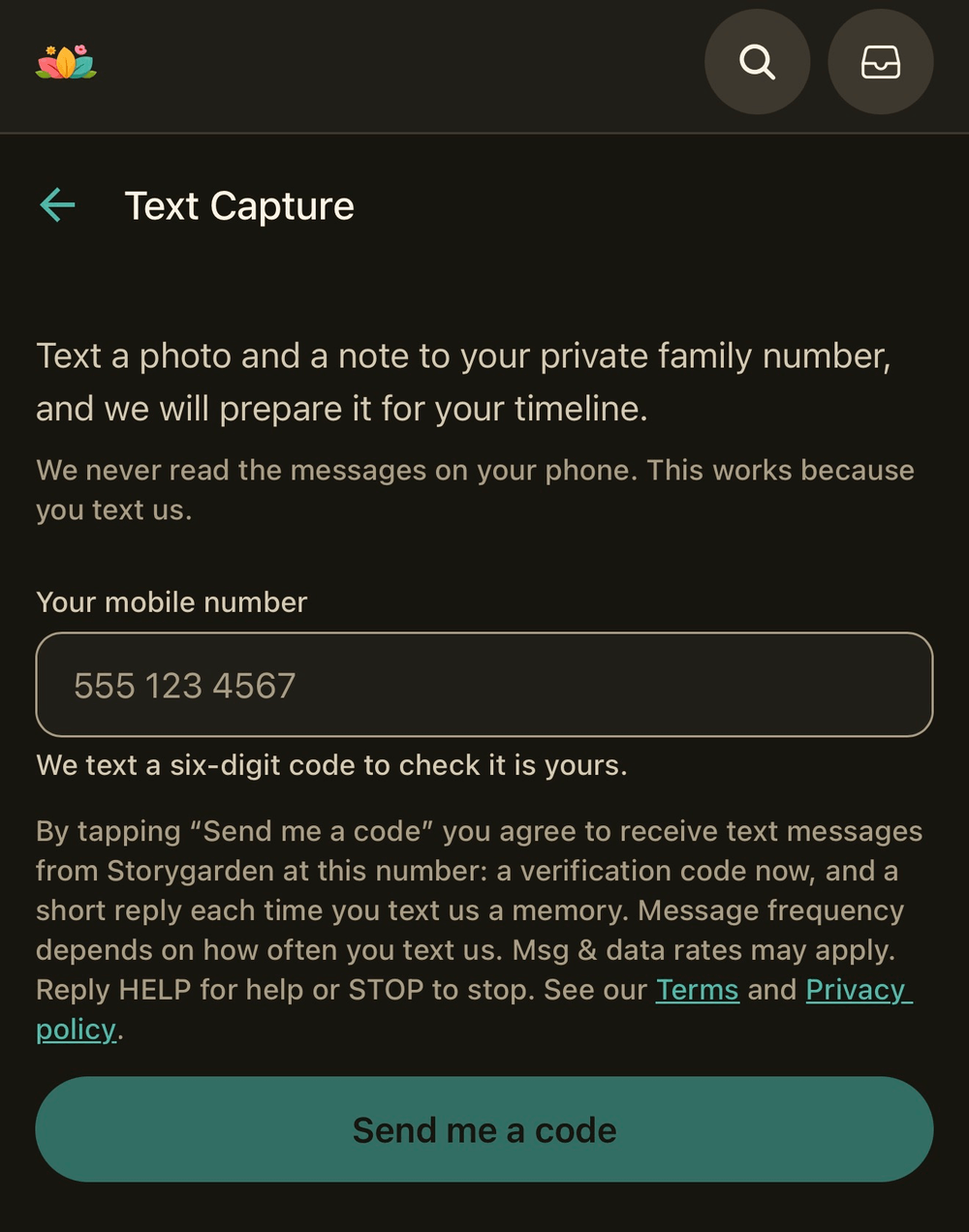
This is the disclosure printed on the Text Capture screen, directly above the Send me a code button. It is reproduced here verbatim so that it can be read without installing anything:
By tapping “Send me a code” you agree to receive text messages from Storygarden at this number: a verification code now, and a short reply each time you text us a memory. Message frequency depends on how often you text us. Msg & data rates may apply. Reply HELP for help or STOP to stop. See our Terms and Privacy policy.
It sits on the screen itself rather than behind a link, and it is agreed to before
any message is sent. The wording lives in
app/(app)/text-capture.tsx; if it changes there it changes here,
because a consent notice that has drifted from the screen it describes is not
evidence of anything.
What we send, and how often
| Message | When |
|---|---|
| A six-digit verification code | Once, when you ask to connect a number |
| A short confirmation that we received your memory | Once for each message you text us |
| A reply explaining why nothing was saved | If we cannot save what you sent |
Every one of those is a reply to something you did. We do not start conversations, so message frequency depends entirely on how often you text us — for most families that is a few messages a week, and for some it is none for months.
Message and data rates may apply, and they are set by your mobile carrier rather than by us.
Stopping
Reply STOP to any message and we will stop texting that number. You can also turn Text Capture off in the app, under Settings → Text Capture, which does the same thing.
Stopping affects new messages only. Everything already saved to your timeline is yours and stays exactly where it is.
Reply START to turn it back on, or HELP for a reminder of how it works and where to reach us.
Your number
We store your number so we can recognise your messages and reply to them, and for nothing else. Neither your number nor your agreement to be texted is sold, rented, or shared with anyone for their own marketing — not with advertisers, not with data brokers, and not with other companies we work with. The only party that receives it is the messaging provider that carries the messages between you and us, and it may only use it to deliver them.
The privacy policy describes how the number is stored, and how to delete it along with the rest of your account.
Delivery
Text messages travel over mobile networks we do not control. Neither we nor the mobile carriers guarantee that every message arrives, or that it arrives promptly. If a memory you texted has not appeared, it will be in the app's review inbox or else we will have texted you to say why.
Availability
Text Capture is a separate subscription, because every message costs us money to receive. It is not included in Standard or the Family Package, and it is available in the United States only.
Help
Write to support@story-garden.app. A real person reads it, and you do not need to be able to open the app to reach us.